
Windows 10 is reaching End of Service
As of 14th October 2025, Microsoft will no longer be providing security updates and patches to Windows 10.
We recommend upgrading to Windows 11 to enjoy the latest features and improvements – either on your current compatible device or by choosing a new device that comes with Windows 11 pre-installed.
Read on to learn how to check if your device is ready for Windows 11 and what to do next.
Why upgrade to Windows 11?
Stay Protected from Threats
Upgrading to Windows 11 ensures you continue receiving essential security updates that help protect your data and devices from viruses, malware and other digital threats.
Keep Software Running Smoothly
New apps and updates are primarily designed for Windows 11 and may stop supporting Windows 10. Staying current helps avoid compatibility issues and ensures your software performs at its best.
Get Help When You Need It
Once support for Windows 10 ends, Microsoft will no longer provide support or troubleshooting, even for critical issues. Upgrading keeps you eligible for technical support and troubleshooting.
Meet Business and Compliance standards
For businesses, running a supported and up to date operating system is essential for meeting industry regulations and maintaining strong security practices.
Is my computer Windows 11 compatible?
If your device is currently running Windows 10, the first step will be to check if your device is compatible with Windows 11.
- Visit our showroom and our friendly team will assess your device and guide you through your options.
- Or use Microsoft’s PC Health Check tool to get a quick compatibility report. Learn more here: PC Health Check

Why can't my PC run Windows 11?
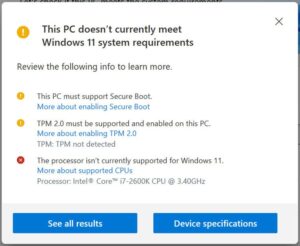
If the PC Health Check tool shows red errors, your device does not meet the minimum requirements for Windows 11 and will likely require replacement.
But don’t worry, yellow warnings are often fixable. These features may be disabled in your BIOS settings or misconfigured. Our in-store technicians can usually help to resolve these issues and get your PC ready for Windows 11 without needing new hardware.
Not sure what your results mean? Just bring you device in, we’ll take a look and help you decide on the best path forward.
Still need Windows 10? Extended Support Is Available
If your business relies on specialized software or equipment that isn’t compatible with Windows 11, Microsoft offers Extended Security Updates (ESU) for Windows 10. This licensing option provides critical security patches beyond the end-of-life date.
Purchasing ESU is only recommended if upgrading to Windows 11 is not feasible due to compatibility of software or specialized hardware. It is a temporary solution designed to to keep essential systems secure while you plan your next steps.
For more details or pricing, contact our team – we’ll help you determine if ESU is the right fit for your setup.